

A simulation can take hours to solve and still be difficult to explain in a meeting. Once the computation is finished, someone has to explore the result, compare a few states, and understand what the colours actually mean.
SIMBA — SIMulation Buffered Animation — is our open-source framework for bringing animated scientific simulations into Unity. The idea is to separate the computation from the experience used to explore it. The numerical solver produces the results, while the viewer makes those results accessible through a camera, a timeline and an interactive scene.

Try the actual viewer
The example below is the existing SIMBA Unity WebGL build, running inside this article. Its current presentation is a free-camera development scene, rather than a finished article-specific interface. It includes a braided-stent line dataset and a Neo-Hookean cube shell dataset. The data have already been computed: interacting with the scene does not launch a new finite-element analysis.
Interactive / original SIMBA WebGL build
Step inside the simulation.
Load the viewer, then click inside the scene to explore it. Move with W/A/S/D, use Q/E to move vertically, and press Esc to release the pointer. The download starts only when you choose to open it.
Desktop recommended. A WebGL-capable browser is required.
The demo is a visualization of its supplied datasets. It is not a new validation of a constitutive model or a clinical prediction.
Geometry changes, and the viewer has to keep up
An animated scientific result is more than an object changing position. Its vertices can move, its connectivity can change, and a scalar field may evolve at the same time. Those changes need to remain synchronized.
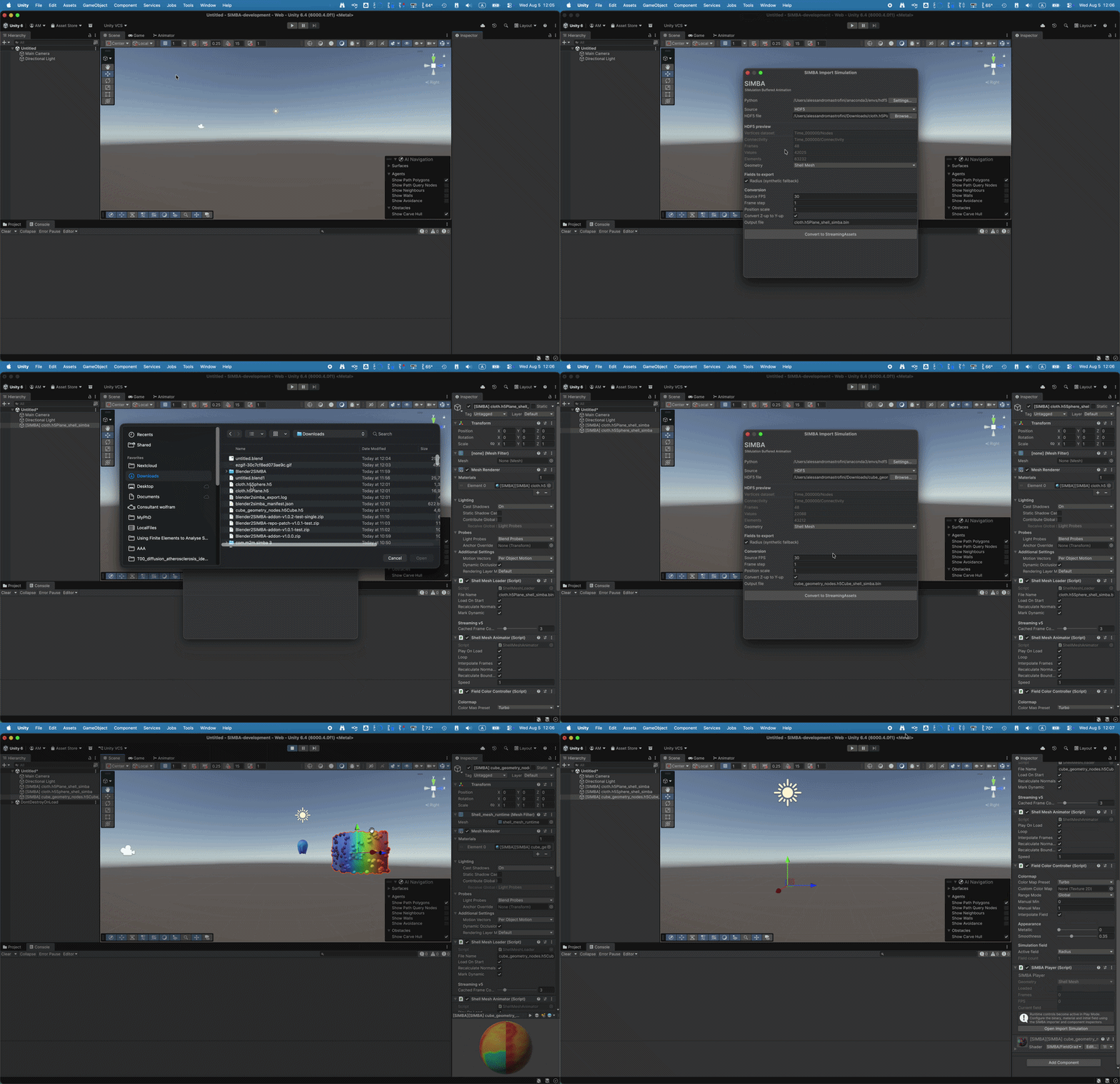
SIMBA provides a binary-data workflow and runtime components for playing these results in Unity. Shell and line representations cover different kinds of examples. A shell can show a changing surface, while a line representation is useful for structures such as the braided stent in the demo.
The format includes storage and compression choices for keeping this workflow practical. These are implementation decisions; I would compare performance only on a specified dataset, device and build. A smooth example on my machine is not a universal benchmark.
From Blender to SIMBA
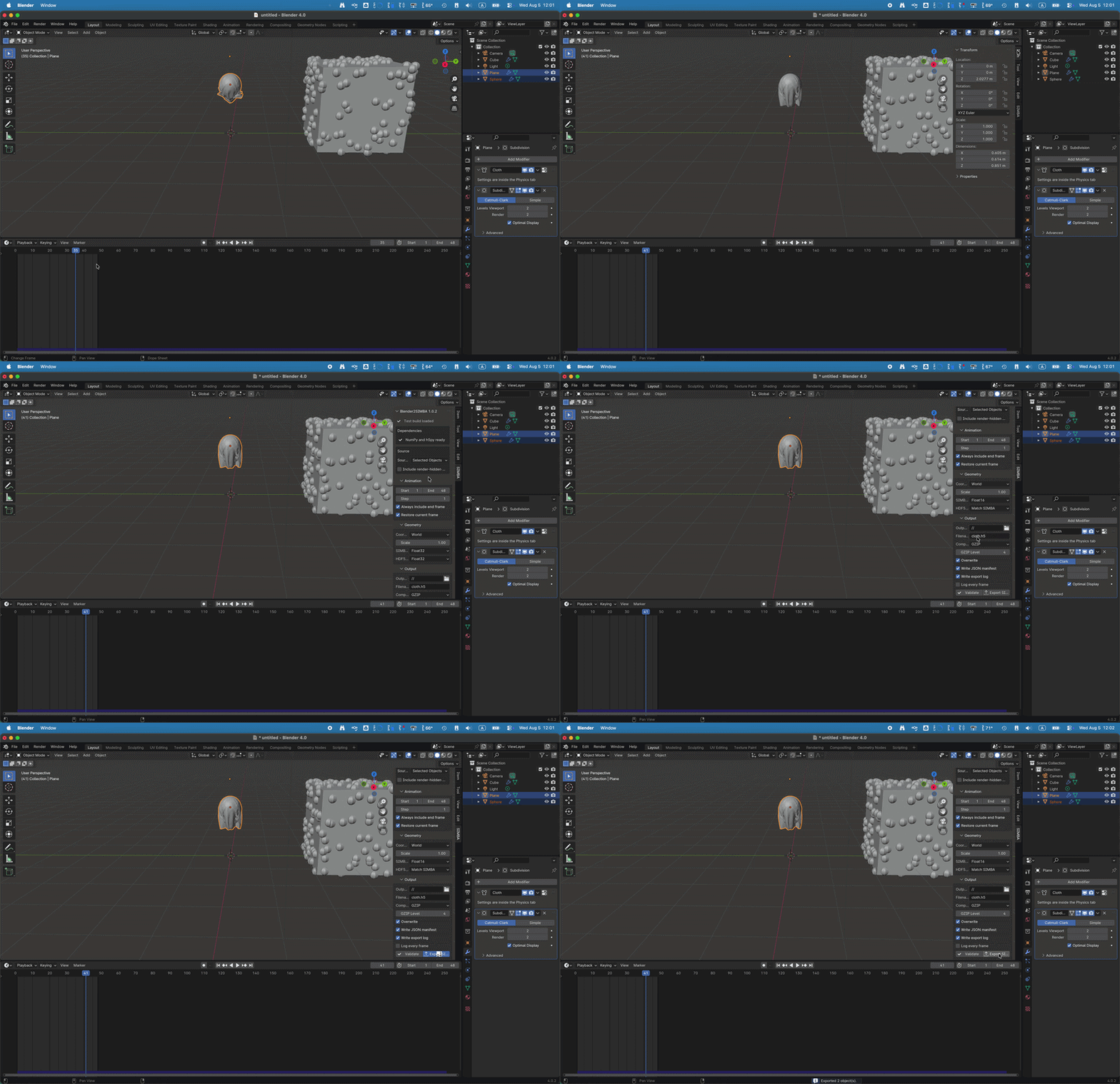
The companion Blender2SIMBA add-on evaluates Blender geometry before exporting it. That means the visible result of modifiers and Geometry Nodes can enter the workflow, instead of assuming that the original mesh alone describes the animation.
flowchart LR
    A[Blender scene] --> B[Evaluated geometry]
    B --> C[Intermediate HDF5]
    C --> D[SIMBA converter]
    D --> E[Binary simulation data]
    E --> F[Unity runtime]
    F --> G[Desktop / Web / XR experience]
The intermediate HDF5 files and the runtime files have different jobs. One is a bridge between tools, while the other is meant to be consumed by the player. Keeping that boundary explicit makes it easier to develop an exporter without treating the Unity scene as the only copy of the result.
Interaction is part of the explanation
A useful scientific viewer should make it easy to return to the same state and ask a different question. What changed with time? Is the shape the computed geometry or a scaled deformation? Which quantity does the colour represent?
Those explanations belong next to the interaction. A colourful object without a quantity, scale or description of the dataset can be attractive and still leave the reader guessing.
The web demo makes that separation tangible: the simulation data are already available, while the viewer gives the reader a way to explore them. A useful next question is what a particular dataset represents, which assumptions produced it, and what its displayed fields mean. The interaction should support that explanation.
The code is available in SIMBA, with the companion Blender2SIMBA exporter.